Legacy Guide - New Guide Available
This guide, based on Legacy PubMed, is now outdated and has been replaced by Searching PubMed, which provides the same information as this guide, and more, but is based on the 2020-present version of PubMed.
Why Use PubMed?
The Health Sciences Library provides access to MEDLINE via the PubMed search system from the National Library of Medicine.
- PubMed covers journal articles in medicine, nursing, dentistry, veterinary medicine, and the health care system.
- It has information about journal articles published in 5,200 journals in 30 languages dating back to 1949.
- PubMed does not include information about meeting abstracts, conference proceedings, dissertations, patents, or websites.
The Basics: Simple Searching & Viewing Results
It is very important that you enter PubMed (MEDLINE) via a UNC-CH library web page. Doing so ensures that you can access library electronic journal subscriptions.
The basic search box is on the top of the PubMed opening page. The drop-down box to the left of the search box is preset to PubMed. Select another option from the drop-down list to process your search in a different NCBI/NLM database. At the bottom of the PubMed opening page are lists of links to help pages, special search tools, and related resources.
Type your search word(s) into the search box and click the Search button. Don't worry about MeSH (Medical Subject Heading) terms, unless you already know them. PubMed will attempt to match (or "map") your search word(s) to appropriate MeSH terms. If you type in more than one keyword or phrase, connect them with the Boolean connectors AND, OR, or NOT. Make sure your connectors are in ALL CAPS!

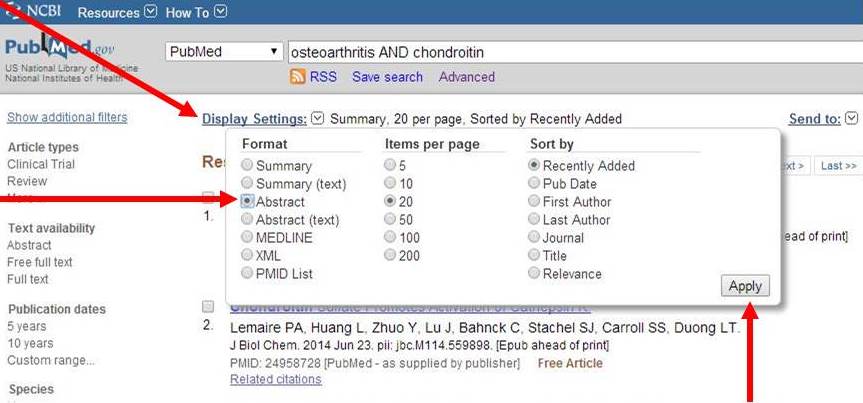
Search results will be displayed below the gray search bar. The default display setting is "Summary" (citation only) with the most recent articles first.

Click the Display Settings link above your search results and select Abstract display to see the citations, abstracts, and Find @ UNC links. PubMed will switch to the newly selected display type when you click Apply.